
This article is a detailed guide to Jeetway login for users in Bangladesh, designed to provide quick and secure account access. It includes clear instructions for logging in via the official website and the Jeetway mobile app for Android and iOS, as well as step-by-step guidance on password recovery if access is lost. You will also find explanations of common issues related to Jeetway account login and practical solutions to help you regain access safely and without delay.
What Is Jeetway Login and Why It Matters
The Jeetway login process is a standard procedure that users complete to access their personal profile. This involves entering credentials into the login form, after which the system verifies the information and redirects the user to their account control panel.. Once authentication is successful, players receive full Jeetway member access to the platform, including:
- Online slots, crash games, and instant lotteries;
- Classic casino games with live dealers;
- Sports betting with competitive odds in Bangladesh;
- Cricket betting exchange;
- Live betting and live streaming;
- Deposits and withdrawals in BDT;
- Daily bonuses and promotional offers;
- Access to betting history and transaction records;
- Full mobile compatibility with Android and iOS devices.
Secure login is essential for protecting your balance, including bonus funds and personal information, from unauthorized access. For this reason, Jeetway applies security checks and session monitoring every time a Jeetway user account is accessed.
Jeetway Login Requirements for Players
Before logging into Jeetway, it is important to understand the basic login and security requirements. Access to the platform is available only to registered users with an active account. You should always use your personal login credentials and make sure you are connected to a stable internet connection.
| Jeetway login requirements | Information |
|---|---|
| Registered account | Access to the platform’s services is only available to registered users. |
| Username | Your unique name on the website |
| Password | This is a set of characters (letters, numbers, and other symbols) that you created during registration. |
When the correct login details are entered, the system identifies you instantly and grants access to your account without delays. Entering an incorrect username or password may prevent successful login, and repeated failed attempts can result in temporary account restrictions for security reasons.
How to Login to Jeetway via Official Website
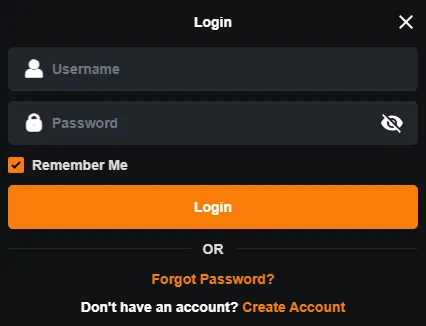
Logging in through the official website is a secure way to access your account from a desktop computer or laptop. For security reasons, you should always use Jeetway website login only through the official domain. Below are the Jeetway login steps to access your account using a web browser:
- Visit the official Jeetway website;
- Open the login page;
- Enter your username;
- Enter your password;
- Click “Login” to access your account.
After completing these steps, you will be redirected to your personal control panel. From there, you can manage account settings, handle transactions, place sports bets, or play casino games.
Jeetway Login Using Mobile App (Android & iOS)
Jeetway app login allows users to access their account from a smartphone or tablet running Android (APK) or iOS. The mobile login option is suitable for players from Bangladesh who prefer to place bets on the go. Steps to log in via the Jeetway app:
- Download the Jeetway app on Android or iOS;
- Open it and click the “Login” button on the main screen;
- Enter your username and password;
- Click the “Login” button.
The app should only be downloaded from the official Jeetway website, as it is not available in official stores. After installation, users can enable biometric login, such as fingerprint or Face ID. In terms of functionality, the app is fully equivalent to the main website and provides access to all account features and settings.
How to enable the “Remember Me” option ?
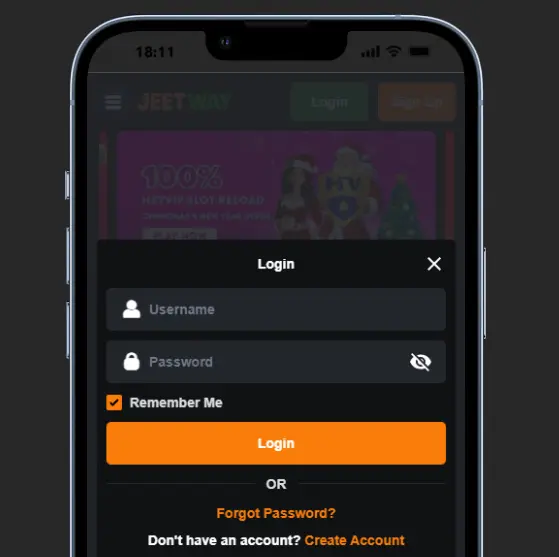
Jeetway remember me is a login feature that, when enabled, will save your credentials on the device you are using. When enabled, you will not need to enter your username and password every time you want to place a bet. Follow these steps to enable it:
- Open the Jeetway login page.
- Enter your username and password.
- Check the “Remember me” box below the login fields.
- Click the “Login” button to access your account.
Now, the Jeetway sign in process is even easier, faster, and more convenient! For security reasons, this option should not be activated on public devices.
Tips to Keep Your Gaming Account Secure After Login
Of course, Jeetway guarantees reliable protection for all user accounts during every gaming session. However, maintaining a secure account also depends on user behavior and awareness. Below, we have compiled practical tips for Jeetway account access that will help prevent unauthorized access and protect your personal data.
- Use a strong, unique password and update it regularly;
- Avoid logging in from public or shared devices;
- Always log out after finishing your session on public networks;
- Keep your browser, application, and operating system up to date;
- Never share your login details with anyone, including customer support staff.
By following these recommendations, you significantly reduce the risk of losing control over your profile and funds, ensuring long-term Jeetway account safety. If you suspect unauthorized access, reset your password immediately or contact Jeetway support for assistance.
How to recover a forgotten password on Jeetway
Losing your password can happen to any user, but it is not a reason to panic. Jeetway provides a simple and secure way to restore access that works on both desktop and mobile devices. To recover Jeetway account access, follow the steps below:
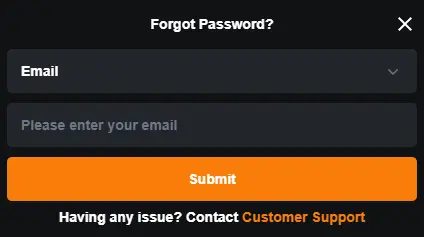
- Click “Forgot password?” on the Jeetway login page;
- Enter your registered email address or phone number;
- Click the “Submit” button;
- Enter the OTP code sent to your email or via SMS;
- Create a new password and confirm it;
- Click the “Submit” button and log in to your account.
The Jeetway password reset process uses a one-time code that remains valid for only five minutes, so it must be entered promptly. If the code does not arrive after several attempts or you experience any issues during recovery, login help is available through customer support.
Jeetway Login Problems and Fixes
Problems logging into Jeetway occur when the system cannot correctly identify the user, and this can be caused by several reasons. In most cases, the issue can be quickly identified and resolved independently without contacting customer support. Below, we explain the most common situations and how to deal with them.
Incorrect Username or Password
This issue occurs when the system displays a Jeetway login error after credentials are entered. It is usually caused by typing mistakes, incorrect capitalization, or the use of an outdated password after it has been changed. Browser autofill tools may also insert old login details that no longer match the current credentials. In this case, users should manually re-enter their username and password and make sure the correct keyboard language is selected. If the error continues, resetting the password is the recommended solution.
Account Temporarily Locked
A temporary account lock typically occurs after several unsuccessful login attempts within a short period of time. The system automatically restricts access to protect the account and prevent unauthorized activity. This Jeetway access issue is temporary and does not mean the account has been permanently blocked. In most cases, access is restored after a short waiting period or after completing identity verification. Users can then log in again without further restrictions.
Mobile App Not Loading
When the mobile app fails to load, the issue is often related to outdated software or an unstable internet connection. Users may notice that the app freezes, closes unexpectedly, or does not move past the loading screen. Clearing the app cache or restarting the device usually resolves the problem. It is also important to ensure the app is updated to the latest version. If the issue persists, reinstalling the application is recommended.
How to register at Jeetway Casino?
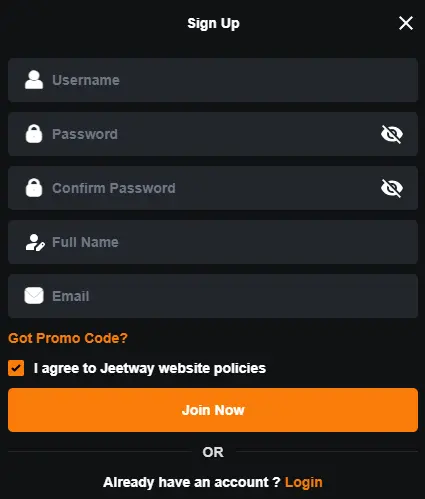
If you don’t have a Jeetway account yet but have decided to become part of the best betting site in Bangladesh, now is the time to register. To do so, go to the official website, click on the sign upbutton, and enter the following information:
- Currency (BDT is available)
- Username and Password
- Your full name
- Phone number in Bangladesh
- Email address
When the login details are entered correctly, users can securely access their Jeetway account from a computer, smartphone, or tablet without any complications.
Conclusion
In conclusion of this Jeetway login guide, it is important to highlight the simplicity and reliability of the authorization process. When the login details are entered correctly, users can securely access their Jeetway account from a computer, smartphone, or tablet without any complications. However, to avoid the risk of personal data leaks, access should be made only through the official Jeetway website or the official Android and iOS applications.
Although the Jeetway BD account is protected by modern security systems on the platform’s side, users should not ignore the safety recommendations outlined in this review. If any login issues occur, they can usually be resolved independently, or assistance can be requested from Jeetway customer support.