
The Jeetway App is the official mobile platform that allows users to access all the features of the main website from their smartphones and tablets. The Jeetway mobile app is free and compatible with all modern Android and iOS devices, which makes it popular among players in Bangladesh.
By downloading the app, users can place sports bets on their favorite teams, play online casino games with live dealers, participate in the bonus program, and manage their accounts. All you need to install it is a compatible mobile device and a stable internet connection.
This Jeetway app download guide explains everything you need to know about using the application safely and effectively. In the sections below, you will find detailed instructions on how to download and install the app, an overview of its main features, supported devices, security measures, and practical tips that will be useful for every user.
Jeetway Mobile App Overview
| Mobile Application | Jeetway App |
|---|---|
| Operator | VB Digital N.V. |
| Availability by country | Bangladesh, India |
| Betting options | Sports betting, Crash Games, Slots, Live dealer games |
| Download cost | Free |
| Available mobile devices | iOS and Android |
| Supported languages | English, Bengali, Hindi |
| Gaming License | Curaçao (License No. 365/JAZ, Master License GLH-OCCHKTW0712302019) |
| Mobile payments | Visa, Mastercard, bKash, Nagad, Rocket |
What Is the Jeetway App? Mobile Betting Explained
The Jeetway app is a reliable mobile application with all the functionality of the main website and its own set of options that are highly valued by players. Users highlight its user-friendly interface, high speed, and ease of use.
All content available on the desktop website can be found in the app without any loss of graphics or sound quality. Users can also place sports bets in pre-match and live modes, play online casino games, and enjoy games with live dealers without noticing any difference.
Compared to the desktop version, the interface of this mobile betting app in Bangladesh was created without unnecessary elements or visual overload. Although at first glance the menu may seem simplified, this is not the case; it is simply more compact and structured specifically for use on smartphones and tablets.
Why Use the Jeetway App Instead of the Website?
Accessing Jeetway services through the app and a browser is two technically different solutions. While the Jeetway app works as separate software installed on your device, the website is accessed through a third-party web browser. This difference affects performance, stability, and security and represents clear Jeetway app benefits.
When using the browser version, performance is affected by the browser engine, installed extensions, and cache. At the same time, system limitations can affect loading speed, which may negatively affect real-time sports betting or live casino games where every second counts. These factors highlight the practical Jeetway mobile advantages.
Other important advantages of the Jeetway mobile app are push notifications and biometric login, features that modern browsers cannot offer due to technical limitations. For these reasons, many users consider it a Best betting app BD option.
Jeetway App Requirements (Supported Devices & Systems)
Although the Jeetway app can run on most modern smartphones and tablets, we recommend checking your device against the minimum requirements before installing it. The mobile app requirements refer to the basic technical characteristics of your device that directly affect performance and stability. We have compiled the following table specifically for this purpose.
| Requirement | Android | iOS |
|---|---|---|
| Operating system | Android 5.0 and above | iOS 11.0 and above |
| Supported devices | Android smartphones and tablets | iPhone and iPad |
| Processor | Dual-core 1.2 GHz or higher | Dual-core Apple processor or higher |
| RAM | 1 GB or more | 1 GB or more |
| App size | 6.80 MB | 6.80 MB |
From a technical point of view, Jeetway Android compatibility allows the app to run on most commonly used devices.At the same time, the Jeetway iOS App provides stable performance on most iPhone and iPad models. Do not be confused by the small size of the installation file, as it contains only the core components of the app. The Jeetway app system requirements are quite low; however, keep in mind that the main content is downloaded automatically after installation, so the recommended free storage space should be at least 120 MB.
How to Download the Jeetway App Safely
The Jeetwin app for iOS can be downloaded in the usual way via the official App Store. However, the Jeetway official app for Android is not available on Google Play due to restrictions on gambling-related software.
The only reliable source for downloading the Jeetway app is the official website, so installing it from other platforms may put your device at risk. Users should always avoid fake Jeetway apps that may look similar to the original but are not authorized. In the following sections, we will explain how to download and install the Jeetway mobile app for Android and iOS correctly.

Jeetway App for Android Devices
The Jeetway app for Android is distributed in APK format, which is the standard file type used for Android apps downloaded from sources other than Google Play. This file must be downloaded manually, but this process does not pose a security threat if it is obtained from the official website. Here are detailed instructions on how to download the Jeetway APK latest version:
- Log in to your personal account;
- Open the apps section in the main menu;
- Select “Download for Android”;
- Confirm the download and wait for it to complete.
After that, the Jeetway APK file will appear in the “Downloads” folder on your device. Before starting the installation, make sure that the file has been downloaded completely and does not contain any errors.
APK File Installation Guide
After completing the Jeetway download process, you need to install the APK file manually. The procedure takes no more than two minutes and consists of the following steps:
- Open Settings on your device and go to Security.
- Enable installation from unknown sources.
- Open the Downloads folder and select the Jeetway APK file.
- Confirm the action to install the APK file and wait for the process to complete.
After installation, the Jeetway app icon will appear on the home screen. In normal mode, the application can be launched with a single tap without requiring additional permissions.
Jeetway App for iOS ( iPhone & iPad )
The Jeetway app for iPhone and iPad can be downloaded either directly from the official website via a dedicated link or through the official Apple store. Both options follow standard iOS procedures and do not require any special settings or additional permissions. The Jeetway app download iPhone process is familiar to most users and does not cause technical issues.
- Open the official website and go to the applications section.
- Find the official Jeetway iOS link.
- Once in the App Store, click on the “Get” button.
- Click “Install.”
- Open the application and log in.
On iPhone and iPad, the Jeetway app supports Face ID login, allowing you to access your account without entering a password. And when used with Apple Watch, you can track betting results or sports event announcements right on your wrist.
How to Sign Up Using the Application
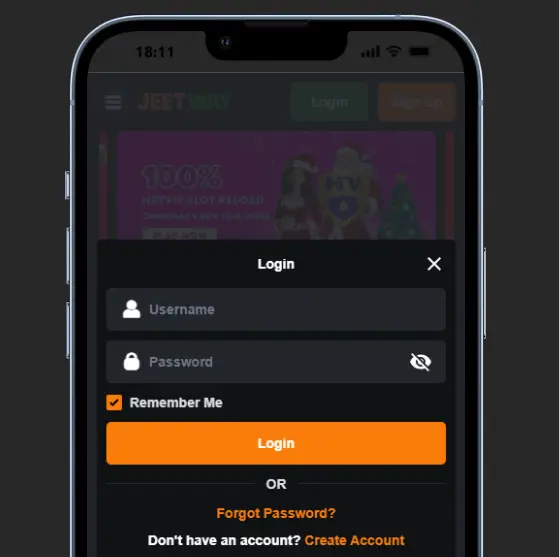
The Jeetway app sign up process is convenient, secure, and fully identical to registration on the official website. By creating an account through the app, users receive a single profile that can be used both on mobile devices and on a desktop computer.
- Open the app and tap the “Sign Up” button.
- Select BDT as your preferred currency.
- Enter your username and create a strong password.
- Add your full name, email address, and mobile phone number.
- Enter a promo code if you have one (optional).
- Accept the policies and tap “Join Now.”
After completing mobile registration, the system will automatically redirect you to your account. Here you can manage your settings, update your personal information, change passwords, and track your betting history. For additional protection, you can immediately enable two-factor authentication.
Logging into Jeetway account via mobile app
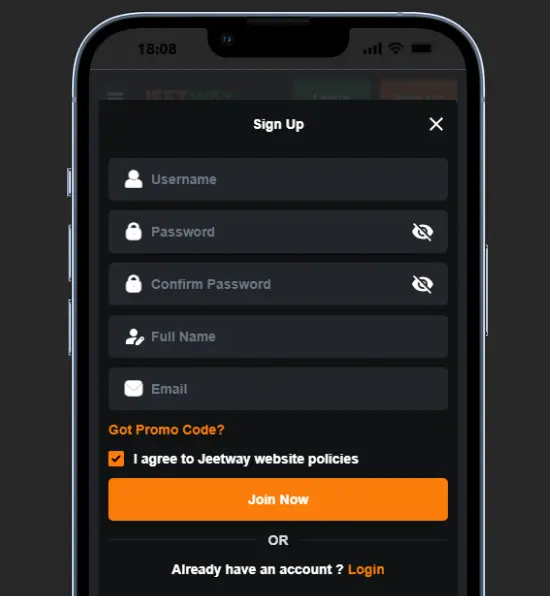
Logging into the Jeetway account via the mobile app can be done in two ways: using the standard method or through biometric authentication. Below, we will describe step by step the standard login method that is available to all users by default.
- Open the Jeetway mobile application;
- Tap the green “Login” button;
- Enter your username and password;
- Tap “Login” to access your account.
To avoid having to enter your login details every time, you can enable biometric authentication in the Jeetway app. This option can be activated in your smartphone’s security settings by allowing the app to authenticate using Face ID or fingerprint recognition, depending on your device’s operating system.
Jeetway App Interface, Navigation & Design
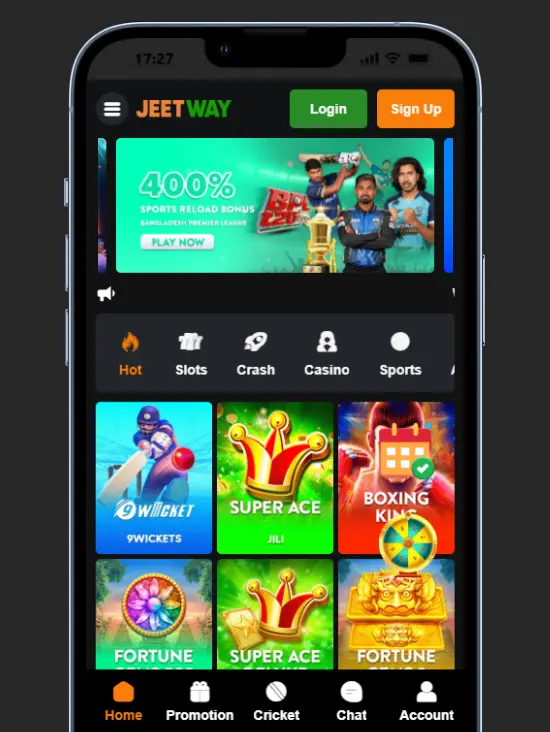
The Jeetway app interface is intuitive and easy to navigate from the very first launch. The main menu is presented in a “hamburger” format, and once you open it, you can access key sections such as promotions, sports betting, the VIP club, tournaments, the referral program, and customer support.
At the top of the main screen, users will see regularly updated promotional banners featuring current offers. Just below, you will find casino game categories such as slots, crash games, arcade games, table games, lotteries, and a live dealer section. Payment methods are displayed at the bottom of the interface, where you can also find licensing information and links to Jeetway’s social networks to follow updates.
The app supports light and dark themes, which are convenient to use depending on lighting conditions. Switching between sections is smooth and responsive with a single touch, even on older devices, thanks to optimized mobile app navigation.

Jeetway App Features and Highlights
The main Jeetway app features are sports betting, online casino games, and transactions. Other options serve as supporting features and help make the app more user-friendly. Even if you have no prior experience with similar apps, you will understand how it works very quickly.
- Quick-access menus;
- Live casino lobby;
- Sports betting shortcuts;
- Fast load speeds;
- Real-time odds updates;
- Push notifications;
- User-friendly interface in Bengali and English.
The app was developed specifically for users in Bangladesh, which is reflected in the quality of localization and content presentation. All sections are available in English and Bengali, and this is not a basic translation like those offered by competitors, but a specially designed product created for local users.
Casino Games and Sports Betting on the Jeetway App
The Jeetway sports betting app offers the same content and functionality as the main website, with the difference that it is fully adapted for smartphone screens. The games are optimized for small displays, and control is carried out using touch gestures instead of a mouse.
The casino section of the Jeetway app contains several thousand games, divided into categories. The casino lobby consists of slots, crash games, arcade games, lotteries, and an exclusive section. The casino app also offers dozens of games with live dealers, which are broadcast in real time from professional studios.
The betting section is also divided into categories by sport, including cricket, kabaddi, football, basketball, tennis, and baseball. The application supports pre-match and live betting and is considered the best cricket betting app in Bangladesh.

Bonuses and Promotions Available on the Jeetway App
The Jeetway mobile app provides access to 23 active promotions. These offers are divided into categories, including Welcome Offer, Slots, Live Casino, Sports, Fishing, Lottery, Table, Arcade, and Crash. The Jeetway app bonuses and mobile promotions include both permanent offers and limited-time campaigns designed for different types of players.
Some of the most attractive and profitable promotions include:
- 100% deposit bonus up to 1,000 ৳ on the Gates of Gatot Kaca Super Scatter game;
- 150% first deposit bonus up to 1,000 ৳ on JILI games;
- 40% welcome bonus up to 200 ৳ for all games;
- 65% Daily Reload Bonus up to 6,500 ৳;
- 600 ৳ Unlimited Refer Bonus;
- 25% HEYVIP Cricket Deposit Bonus up to 15,000 ৳.
Before activating any offer, users should carefully read the wagering requirements and bonus terms and conditions. Particular attention should be paid to time-limited campaigns, as some bonuses are only available for a short period and are usually more lucrative.

Is the Jeetway App Safe and Secure?
Users often wonder, is Jeetway app safe, especially when it comes to payments and personal data. The app uses several layers of protection that operate continuously in the background. Key features of a secure betting app include:
- SSL/TLS encryption;
- End-to-end connection encryption;
- Secure session management;
- Account authentication protection;
- Two-factor authentication (2FA);
- Biometric authentication;
- Fraud detection scanner;
- Secure payment gateways.
User data is stored on servers with restricted access. Payment transactions are processed through secure channels that comply with strict data-handling standards, ensuring a high level of Jeetway app security. The platform, like the main website, allows users to place bets, play games, and manage funds with confidence.
Jeetway App Not Working? Common Issues and Fixes
If the Jeetway app is not working properly or won’t launch, it is usually caused by technical issues. Most of these can be resolved with a few simple steps, without having to reinstall the app or contact support. Below are the most common problems encountered by users and how to fix them.
- App not opening: If the app won’t launch or closes immediately, restart your device. Make sure you have the latest version installed. Clearing the cache will also fix this type of Jeetway app error.
- Login error: Login issues can occur due to incorrect credentials or temporary server delays. Double-check your username and password and, if necessary, reset it using the recovery option. If biometric login is enabled, try switching to standard login to rule out authentication conflicts.
- Update problems: If the app does not update or does not work properly after updating, the issue is most likely related to the operating system version. This type of Jeetway APK problem occurs on Android devices. Usually, the issue can be resolved by updating the operating system to the latest version and restarting the app. If the issue persists, it is recommended to reinstall the app.
- Slow loading: Slow loading may be related to network stability or background processes running on the device. Switching to a stable Wi-Fi connection and closing unused apps can significantly improve performance.
As you can see, most technical issues can be easily resolved if the cause is correctly identified. However, there are other issues that users may encounter that cannot be resolved on their own, such as scheduled maintenance or payment processing delays. In these situations, you simply need to wait or contact Jeetway support for assistance.
Final Verdict – Should You Download the Jeetway App?
In this Jeetway app review, we highlight its stable performance, ease of use, and high functionality. It loads quickly and is easy to install on most modern Android and iOS devices. It works well even on budget smartphones and tablets, making it popular among sports betting enthusiasts and casino players. After installing the Jeetway app, users can play slots, arcades, crash, and table games with live dealers, as well as place pre-match and live bets on cricket, football, basketball, kabaddi, and tennis. We can confidently recommend that users in Bangladesh download the Jeetway app, but only from official sources to avoid risks.
Jeetway App FAQs
Yes, the app is available for free, but it should only be downloaded from official sources such as the Jeetway website for Android and the App Store for iOS, which is also recommended in the Jeetway app FAQ section.
You can deposit and withdraw funds directly in the app using local payment systems such as bKash, Nagad, and Rocket, with additional guidance available through Jeetway mobile help if needed.
Yes, the app fully supports live betting on cricket, kabaddi, football, and other sports.
Yes, the Jeetway APK is safe to install if downloaded from the official website.